
Music Box Add-On: Making Your Lights React to Sound
The Jellyfish Music Box add-on lets permanent lighting react to sound and music. Here's how it works, what it needs, and where it fits best.
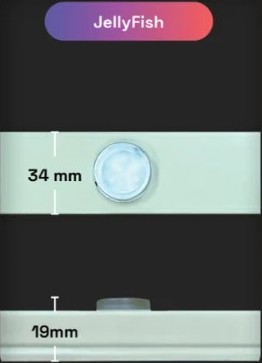
The Music Box add-on lets your permanent lighting system react to sound, syncing color changes and movement to music or ambient noise instead of running a fixed preset scene. It connects to an existing Jellyfish system as an add-on component rather than a standalone product.
We get more questions about this feature than almost any other add-on, mostly from homeowners who host gatherings, parties, or holiday events and want their lighting to feel more responsive during those moments.
This post covers how the Music Box actually works, what it needs to function, and where it fits into a broader lighting setup.
What the Music Box add-on actually is
Music Box is a hardware add-on that connects to an existing permanent lighting controller and analyzes sound input to drive color and brightness changes in sync with what it hears. It is not a separate lighting system, it is a component that changes how your existing lights behave under specific conditions.
Because it plugs into your current setup, adding it does not mean replacing any of your existing track or fixtures. You are adding a feature to a system you likely already have installed.
This distinction matters because it means Music Box is generally a smaller add-on project rather than a full lighting install, both in terms of scope and cost.
How the lights respond to sound
The add-on picks up audio, either through a built-in microphone or a direct line-in connection, and translates the pattern of sound into changes in the lighting output. Louder moments in a song might trigger brighter or more dramatic color shifts, while quieter sections calm the light pattern down.
This is different from a scheduled scene, which runs on a fixed timer or sequence regardless of what is happening around it. Music Box responds live to whatever sound source it is picking up.
The specific behavior, how sensitive it is, how dramatic the color shifts are, is generally adjustable through the app rather than fixed at one setting.
What you need before adding Music Box to your system
Music Box requires a compatible existing controller, so this is generally not something you add to a lighting system without first confirming compatibility with your current setup. If you already have a permanent lighting system installed by us, we can check compatibility directly.
You also need a sound source for it to respond to, whether that is ambient noise from speakers already at your gathering or a direct audio feed from a specific source. Which approach makes more sense depends on how you plan to use it.
If you are considering a new install and know you want Music Box from the start, mention it during your initial free quote so the system is set up with that add-on in mind from the beginning.
Where this feature gets the most use
Homeowners who host parties, graduation gatherings, holiday events, or backyard get-togethers tend to get the most value from Music Box, since it adds a responsive, dynamic element specifically suited to those moments. It is less useful for a quiet weeknight when you just want a steady warm white glow.
Some homeowners set it up specifically for a recurring event, like a Fourth of July gathering or a holiday party, and otherwise run their lighting on standard scenes the rest of the year.
It is a feature you turn on for specific occasions rather than one that changes your everyday lighting experience.
- Backyard parties and gatherings
- Holiday events with music playing
- Graduation parties or celebrations
- Specific recurring annual events
Setting expectations for how it performs
Sound-reactive lighting works best when there is a clear, consistent audio source nearby, rather than faint background noise from far away. A direct audio connection generally gives more accurate syncing than relying on a microphone to pick up sound from across a yard.
It is also worth remembering this is an add-on feature layered onto a lighting system built primarily for everyday and holiday scenes, not a dedicated concert-grade sound-to-light rig. It performs well for its intended residential use, but expectations should match that scope.
We can talk through placement of the microphone or audio connection during setup to get the best real-world performance for your specific space.
Frequently asked questions
Can I add Music Box to a lighting system I already have installed?
In many cases yes, as long as your existing controller is compatible. We can confirm this by checking your current setup before scheduling the add-on install.
Does Music Box need a microphone or can it take a direct audio feed?
It can generally do either, picking up ambient sound through a built-in microphone or connecting directly to an audio source, depending on which setup fits your use case.
Is Music Box worth it if I only host a couple of events a year?
That is a reasonable use case. Many homeowners set it up specifically for recurring gatherings or events and run standard scenes the rest of the year.
Does Music Box replace the app scenes I already use?
No, it is an additional mode you use for specific moments. Your existing scheduled scenes and scenes still work the same way when you are not using sound-reactive mode.
The bottom line
- Music Box is an add-on that syncs your existing lighting system to sound, not a standalone product.
- It requires a compatible controller, so confirm compatibility before adding it.
- A direct audio feed generally syncs more accurately than relying on ambient microphone pickup.
- It adds the most value for parties, holidays, and recurring events rather than daily use.
- Mention Music Box during your quote if you know you want it from the start of a new install.
Curious if Music Box works with your setup
We can check compatibility with your existing lighting system and walk through what adding sound-reactive lighting would involve.
Explore Music Box